

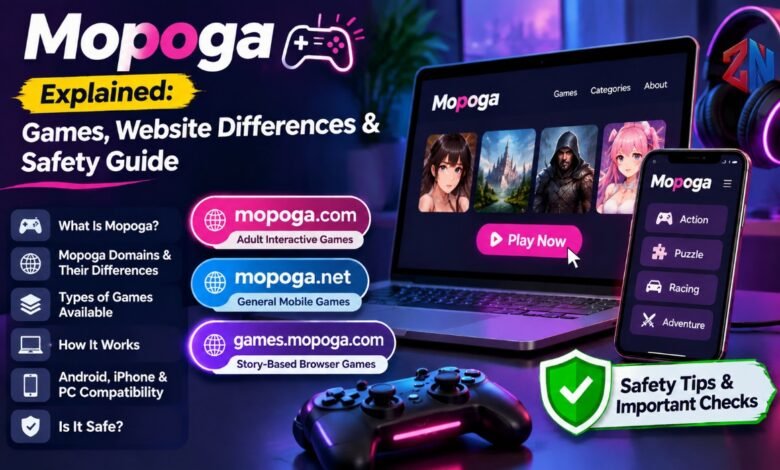
Mopoga is a name used across several gaming-related web addresses, rather than one clearly defined game or app. Depending on the address, visitors may find adult-oriented interactive games, casual mobile-game listings, or story-based browser titles. Someone looking for a puzzle game could encounter mature content, while a visitor expecting instant browser play may be sent to an app store.
This guide compares the main gaming domains, explains how browser play works, and outlines the privacy and safety checks worth making before you click “Play.”
What Is Mopoga?
The name is used by websites that list or host games for browsers and mobile devices. It is not one consistent platform with a single catalogue or content policy.
Mopoga.com says it launched in 2020 and uses the name as an abbreviation for “Mobile Porn Games.” It describes an adult-oriented HTML game library, with many titles built using Twine, an interactive-storytelling tool. The site says its games are adapted for mobile and desktop devices.
Other related web addresses present different offers. Mopoga.net promotes general mobile games, while games.mopoga.com is a subdomain of mopoga.com whose landing page highlights visual novels, RPGs, simulations, and fantasy adventures. The name alone does not tell you what content to expect.
Mopoga Domains: What Is the Difference?
Before using the site, identify the complete domain in your browser’s address bar. Similar names and logos do not, by themselves, prove that two separately registered websites have the same owner or share the same privacy practices.
| Domain | What its current pages present | What to know |
|---|---|---|
| mopoga.com | Adult-oriented interactive and HTML games | The site explicitly identifies its focus as adult games. It is not suitable for children or users expecting a family-friendly game portal. |
| mopoga.net | General game listings, including puzzle, racing, action, simulation, sports, and casual titles | Its pages promote free mobile games and no downloads, but some “Play Now” links lead to external services such as Google Play or CrazyGames. It is better understood as a game-listing and discovery website rather than a guarantee that every listed game runs directly in the browser. |
| games.mopoga.com | A subdomain of mopoga.com featuring story-led browser games, including visual novels, RPGs, simulations, and fantasy titles | It advertises browser access without installation or sign-up, but some listed games include mature themes. It should not be treated as a separate top-level domain. |
These descriptions reflect the pages reviewed, not a guarantee of ongoing availability. The pages do not establish that all separately registered, similarly branded domains share one operator.
What Types of Games Can You Find?
The available genres depend on the domain.
Adult Interactive Games
Mopoga.com focuses on adult-oriented games and interactive stories. Its About page says many titles use Twine, which supports text-based stories with choices and branching paths. A title may feel more like an interactive novel than an action game. The site says many projects are ongoing, so updates and save compatibility can vary.
Casual and Mobile-Style Games
Mopoga.net lists familiar categories such as action, adventure, arcade, puzzle, racing, sports, strategy, and simulation. Its game catalogue includes examples such as 100 Doors, 2048, 3D Bowling, and racing titles. These listings can help visitors discover games by genre, although the destination behind each play button should be checked before proceeding.
Visual Novels and Story-Driven Games
The games.mopoga.com subdomain highlights visual novels, role-playing games, simulations, fantasy adventures, and choice-based stories. In these games, dialogue choices or decisions can influence how the story develops. Some titles may include romance or mature themes, so read the game description before opening it.
How Does Mopoga Work?
On a domain that genuinely hosts browser games, the game loads inside a web page using browser technology such as HTML5 and JavaScript. You do not need a separate game launcher for that title. However, not every listing on these sites necessarily works this way.
A sensible way to start is:
- Check the domain. Confirm the spelling and extension before opening a game.
- Read the game description. Look for its genre, age suitability, device support, and any mention of mature content.
- Inspect the Play button. If it leads to Google Play, another game portal, or a different website, you are leaving the original page. Review the destination before continuing.
- Avoid unexpected installers. A browser game should not require you to install an unknown APK, browser extension, or “special player” just because a pop-up says so.
- Test the controls. On a phone, check whether the game uses touch controls and whether it works in portrait or landscape mode.
This approach prevents a common misunderstanding: a website may advertise a no-download experience while some individual listings send visitors to third-party apps or services.
Is Mopoga Free to Use?
Some pages advertise free access. The browser-games subdomain, for example, describes its library as free and says no account or installation is required. The mobile-game listing site also promotes free games. Those are statements made by the respective websites, not proof that every linked game is free in every location or without restrictions.
Check the individual game page for:
- In-app purchases or paid upgrades.
- Advertisements or sponsored links.
- Account or sign-in requirements.
- Regional restrictions.
- External app-store downloads.
A free listing does not necessarily mean that the linked game has no optional purchases. If a page asks for payment details to unlock something that was advertised as free, pause and verify that you are on the expected site.
Does Mopoga Work on Android, iPhone, and PC?
Compatibility varies by domain and by game. The main site says its titles are adapted for iOS, Android, PC, and Mac. It also notes that some mobile games may display better in landscape mode, even though the site aims to support portrait play.
The browser-games subdomain similarly advertises PC and mobile browser access, while warning that controls and performance differ by title and device. The mobile-game listing site promotes Android and iOS access, but its game listings sometimes redirect to app stores or external gaming sites.
For the best chance of smooth play:
- Use an updated browser such as Chrome, Safari, Firefox, or Edge.
- Keep enough free memory available by closing unused tabs.
- Use a stable connection.
- Rotate the phone if text or controls are cut off.
- Try another supported browser if a game does not load.
A mobile-friendly website is not the same thing as a native mobile app. Do not install an APK from an unfamiliar download page simply because it uses that brand name.
Is Mopoga Safe?
There is no single yes-or-no answer because the domains differ in content, advertising, privacy policies, and game destinations. It is useful to separate content safety from technical safety.
Content and Age Suitability
The main site explicitly describes itself as an adult-games site. It should not be treated as a child-friendly destination. Other related pages, including the mobile-game listing site and the browser-games subdomain, list general game genres, but a general games catalogue is not automatically suitable for every age. Parents should check the exact domain, individual game descriptions, and device-level parental controls before allowing access.
Privacy and Advertising
The privacy policy published by the main site says its server logs may record details such as IP addresses, browser type, internet service provider, timestamps, and referring pages. It also explains that third-party advertising partners may use cookies or web beacons and receive visitors’ IP addresses. The policy applies to that domain; it should not be assumed to describe the practices of other separately registered, similarly named sites.
Before sharing information, read the privacy policy for the exact domain you are using. Avoid entering personal details, payment information, or passwords unless there is a clear and legitimate reason.
Practical Safety Checklist
Use these precautions on any unfamiliar gaming website:
- Check the full URL and look for misspellings or unexpected redirects.
- Keep browser security warnings enabled.
- Do not ignore a browser warning to continue to a potentially dangerous page.
- Do not download unknown APK files, extensions, or software updates from pop-ups.
- Do not reuse an important password on an unfamiliar gaming site.
- Close tabs that display fake virus alerts, urgent messages, or suspicious prize claims.
Google Chrome’s Safe Browsing guidance recommends avoiding sites flagged as dangerous and being cautious with downloads. A padlock or HTTPS connection is useful, but it does not prove that a website’s content, advertisements, or external links are trustworthy.
Why Is a Mopoga Game Not Loading?
A browser game may fail to start for several reasons: a weak connection, outdated browser software, disabled JavaScript, insufficient device memory, a temporary server problem, or a broken external link.
Try these steps in order:
- Refresh the game page once.
- Check that your internet connection is working.
- Update your browser.
- Close unused tabs and applications.
- Check whether JavaScript is enabled.
- Try another supported browser or device.
- If the Play button opens another service, check whether that destination is still available.
For the main site, the help page explains that saved games can stop working after a developer updates a title. It also says that progress is stored in the browser’s local storage. Clearing site data, changing browsers, or using a private browsing window can therefore cause saved progress to disappear. The site recommends exporting a save when the game provides that option.
Who Is Mopoga Best Suited For?
These sites may suit visitors who want to browse game listings or try a browser-based title without installing a large game package. It is important, however, to choose the correct domain and review each game before playing. The adult focus of the main site, the external links on the mobile-game listing site, and the story-based games advertised on the browser-games subdomain make it unwise to assume every page offers the same experience.
In short, check the address, content rating, Play button destination, privacy policy, and any payment or download request before you continue. If a page asks you to bypass a browser warning or install an unfamiliar file, leave it.
Also Read: AI Influencer: How Digital Characters Grow an Audience & Make Money
Frequently Asked Questions
What Is Mopoga Used For?
The name is associated with several gaming-related websites and web pages. Depending on the domain, visitors can find adult interactive games, casual mobile-game listings, visual novels, and browser-based entertainment.
Is Mopoga Free to Play?
Some of these websites advertise free games. However, individual games may include advertisements, optional purchases, external links, or other requirements. Always check the game page before playing.
Do I Need to Download an App to Play Mopoga Games?
Not necessarily. Some pages advertise browser-based gameplay without installation. However, certain game listings redirect visitors to Google Play or other external platforms.
Is Mopoga Safe to Use?
Safety depends on the specific domain, its content, advertising, and external links. Check the URL, avoid suspicious downloads, keep browser security enabled, and never share sensitive information unnecessarily.
Is Mopoga Suitable for Children?
Not every site is suitable for children. The main site specifically focuses on adult-oriented games. Parents should verify the exact website and review individual game content before allowing access.
Why Does Mopoga Not Save My Game Progress?
Some games save progress in your browser’s local storage. Clearing website data, switching browsers, or using private browsing can remove saved progress. Where available, export your game save as a backup.




One Comment